Thực hành AD part 1 -linux
Series này là của HTB, note lại để học
Gathering
Connect vào rdp thì dùng wireshark capture network SSH thì
ipconfig
┌─[✗]─[htb-student@ea-attack01]─[~]
└──╼ $ifconfig
docker0: flags=4099<UP,BROADCAST,MULTICAST>  mtu 1500
        inet 172.17.0.1  netmask 255.255.0.0  broadcast 172.17.255.255
        ether 02:42:9b:cd:57:69  txqueuelen 0  (Ethernet)
        RX packets 0  bytes 0 (0.0 B)
        RX errors 0  dropped 0  overruns 0  frame 0
        TX packets 0  bytes 0 (0.0 B)
        TX errors 0  dropped 0 overruns 0  carrier 0  collisions 0

ens192: flags=4163<UP,BROADCAST,RUNNING,MULTICAST>  mtu 1500
        inet 10.129.34.194  netmask 255.255.0.0  broadcast 10.129.255.255
        inet6 dead:beef::dfdd:8e23:605c:1f88  prefixlen 64  scopeid 0x0<global>
        inet6 fe80::c609:2996:a862:2dbb  prefixlen 64  scopeid 0x20<link>
        ether 00:50:56:8a:b7:ff  txqueuelen 1000  (Ethernet)
        RX packets 1166  bytes 108412 (105.8 KiB)
        RX errors 0  dropped 47  overruns 0  frame 0
        TX packets 358  bytes 42046 (41.0 KiB)
        TX errors 0  dropped 0 overruns 0  carrier 0  collisions 0

ens224: flags=4163<UP,BROADCAST,RUNNING,MULTICAST>  mtu 1500
        inet 172.16.5.225  netmask 255.255.254.0  broadcast 172.16.5.255
        inet6 fe80::32e6:baa0:e3aa:25da  prefixlen 64  scopeid 0x20<link>
        ether 00:50:56:8a:17:e3  txqueuelen 1000  (Ethernet)
        RX packets 6030  bytes 529848 (517.4 KiB)
        RX errors 0  dropped 21  overruns 0  frame 0
        TX packets 170  bytes 12042 (11.7 KiB)
        TX errors 0  dropped 0 overruns 0  carrier 0  collisions 0

lo: flags=73<UP,LOOPBACK,RUNNING>  mtu 65536
        inet 127.0.0.1  netmask 255.0.0.0
        inet6 ::1  prefixlen 128  scopeid 0x10<host>
        loop  txqueuelen 1000  (Local Loopback)
        RX packets 16  bytes 968 (968.0 B)
        RX errors 0  dropped 0  overruns 0  frame 0
        TX packets 16  bytes 968 (968.0 B)
        TX errors 0  dropped 0 overruns 0  carrier 0  collisions 0
Xác định ens224 là card mạng ngoài , còn ens192 là cái đang kết nối vào máy chúng ta
Sử dụng fping để tìm live host
fping -asqg 172.16.5.0/23
Kết quả
┌─[✗]─[htb-student@ea-attack01]─[~]
└──╼ $fping -asqg 172.16.5.0/23
172.16.5.5
172.16.5.130
172.16.5.225

     510 targets
       3 alive
     507 unreachable
       0 unknown addresses

    2028 timeouts (waiting for response)
    2031 ICMP Echos sent
       3 ICMP Echo Replies received
    2028 other ICMP received

 0.074 ms (min round trip time)
 1.12 ms (avg round trip time)
 2.48 ms (max round trip time)
       14.666 sec (elapsed real time)
Scan 3 targets bằng nmap
┌─[✗]─[htb-student@ea-attack01]─[~]
└──╼ $nmap -sC -sV 172.16.5.5
Starting Nmap 7.92 ( https://nmap.org ) at 2025-11-04 04:06 EST
Nmap scan report for inlanefreight.local (172.16.5.5)
Host is up (0.055s latency).
Not shown: 988 closed tcp ports (conn-refused)
PORT     STATE SERVICE       VERSION
53/tcp   open  domain        Simple DNS Plus
88/tcp   open  kerberos-sec  Microsoft Windows Kerberos (server time: 2025-11-04 09:06:32Z)
135/tcp  open  msrpc         Microsoft Windows RPC
139/tcp  open  netbios-ssn   Microsoft Windows netbios-ssn
389/tcp  open  ldap          Microsoft Windows Active Directory LDAP (Domain: INLANEFREIGHT.LOCAL0., Site: Default-First-Site-Name)
| ssl-cert: Subject:
| Subject Alternative Name: DNS:ACADEMY-EA-DC01.INLANEFREIGHT.LOCAL, DNS:INLANEFREIGHT.LOCAL, DNS:INLANEFREIGHT
| Not valid before: 2023-10-27T13:11:32
|_Not valid after:  2024-10-26T13:11:32
|_ssl-date: 2025-11-04T09:07:19+00:00; -15s from scanner time.
445/tcp  open  microsoft-ds?
464/tcp  open  kpasswd5?
593/tcp  open  ncacn_http    Microsoft Windows RPC over HTTP 1.0
636/tcp  open  ssl/ldap      Microsoft Windows Active Directory LDAP (Domain: INLANEFREIGHT.LOCAL0., Site: Default-First-Site-Name)
|_ssl-date: 2025-11-04T09:07:19+00:00; -15s from scanner time.
| ssl-cert: Subject:
| Subject Alternative Name: DNS:ACADEMY-EA-DC01.INLANEFREIGHT.LOCAL, DNS:INLANEFREIGHT.LOCAL, DNS:INLANEFREIGHT
| Not valid before: 2023-10-27T13:11:32
|_Not valid after:  2024-10-26T13:11:32
3268/tcp open  ldap          Microsoft Windows Active Directory LDAP (Domain: INLANEFREIGHT.LOCAL0., Site: Default-First-Site-Name)
| ssl-cert: Subject:
| Subject Alternative Name: DNS:ACADEMY-EA-DC01.INLANEFREIGHT.LOCAL, DNS:INLANEFREIGHT.LOCAL, DNS:INLANEFREIGHT
| Not valid before: 2023-10-27T13:11:32
|_Not valid after:  2024-10-26T13:11:32
|_ssl-date: 2025-11-04T09:07:19+00:00; -15s from scanner time.
3269/tcp open  ssl/ldap      Microsoft Windows Active Directory LDAP (Domain: INLANEFREIGHT.LOCAL0., Site: Default-First-Site-Name)
| ssl-cert: Subject:
| Subject Alternative Name: DNS:ACADEMY-EA-DC01.INLANEFREIGHT.LOCAL, DNS:INLANEFREIGHT.LOCAL, DNS:INLANEFREIGHT
| Not valid before: 2023-10-27T13:11:32
|_Not valid after:  2024-10-26T13:11:32
|_ssl-date: 2025-11-04T09:07:19+00:00; -15s from scanner time.
3269/tcp open  ssl/ldap      Microsoft Windows Active Directory LDAP (Domain: INLANEFREIGHT.LOCAL0., Site: Default-First-Site-Name)
| ssl-cert: Subject:
| Subject Alternative Name: DNS:ACADEMY-EA-DC01.INLANEFREIGHT.LOCAL, DNS:INLANEFREIGHT.LOCAL, DNS:INLANEFREIGHT
| Not valid before: 2023-10-27T13:11:32
|_Not valid after:  2024-10-26T13:11:32
|_ssl-date: 2025-11-04T09:07:19+00:00; -15s from scanner time.
3389/tcp open  ms-wbt-server Microsoft Terminal Services
| rdp-ntlm-info:
|   Target_Name: INLANEFREIGHT
|   NetBIOS_Domain_Name: INLANEFREIGHT
|   NetBIOS_Computer_Name: ACADEMY-EA-DC01
|   DNS_Domain_Name: INLANEFREIGHT.LOCAL
|   DNS_Computer_Name: ACADEMY-EA-DC01.INLANEFREIGHT.LOCAL
|   Product_Version: 10.0.17763
|_  System_Time: 2025-11-04T09:07:11+00:00
|_ssl-date: 2025-11-04T09:07:19+00:00; -15s from scanner time.
| ssl-cert: Subject: commonName=ACADEMY-EA-DC01.INLANEFREIGHT.LOCAL
| Not valid before: 2025-11-03T08:25:47
|_Not valid after:  2026-05-05T08:25:47
Service Info: Host: ACADEMY-EA-DC01; OS: Windows; CPE: cpe:/o:microsoft:windows

Host script results:
| smb2-time:
|   date: 2025-11-04T09:07:11
|_  start_date: N/A
|_nbstat: NetBIOS name: ACADEMY-EA-DC01, NetBIOS user: <unknown>, NetBIOS MAC: 00:50:56:8a:80:ad (VMware)
|_clock-skew: mean: -15s, deviation: 0s, median: -15s
| smb2-security-mode:
|   3.1.1:
|_    Message signing enabled and required

Service detection performed. Please report any incorrect results at https://nmap.org/submit/ .
Nmap done: 1 IP address (1 host up) scanned in 54.57 seconds
Scan tiếp host 2
┌─[htb-student@ea-attack01]─[~]
└──╼ $nmap -sC -sV 172.16.5.130
Starting Nmap 7.92 ( https://nmap.org ) at 2025-11-04 04:38 EST
Nmap scan report for 172.16.5.130
Host is up (0.049s latency).
Not shown: 992 closed tcp ports (conn-refused)
PORT      STATE SERVICE       VERSION
80/tcp    open  http          Microsoft HTTPAPI httpd 2.0 (SSDP/UPnP)
135/tcp   open  msrpc         Microsoft Windows RPC
139/tcp   open  netbios-ssn   Microsoft Windows netbios-ssn
445/tcp   open  microsoft-ds?
808/tcp   open  ccproxy-http?
1433/tcp  open  ms-sql-s      Microsoft SQL Server 2019 15.00.2000.00; RTM
|_ssl-date: 2025-11-04T09:40:04+00:00; -16s from scanner time.
| ssl-cert: Subject: commonName=SSL_Self_Signed_Fallback
| Not valid before: 2025-11-04T08:26:16
|_Not valid after:  2055-11-04T08:26:16
| ms-sql-ntlm-info:
|   Target_Name: INLANEFREIGHT
|   NetBIOS_Domain_Name: INLANEFREIGHT
|   NetBIOS_Computer_Name: ACADEMY-EA-FILE
|   DNS_Domain_Name: INLANEFREIGHT.LOCAL
|   DNS_Computer_Name: ACADEMY-EA-FILE.INLANEFREIGHT.LOCAL
|   DNS_Tree_Name: INLANEFREIGHT.LOCAL
|_  Product_Version: 10.0.17763
3389/tcp  open  ms-wbt-server Microsoft Terminal Services
|_ssl-date: 2025-11-04T09:40:04+00:00; -16s from scanner time.
| ssl-cert: Subject: commonName=ACADEMY-EA-FILE.INLANEFREIGHT.LOCAL
| Not valid before: 2025-11-03T08:26:02
|_Not valid after:  2026-05-05T08:26:02
| rdp-ntlm-info:
|   Target_Name: INLANEFREIGHT
|   NetBIOS_Domain_Name: INLANEFREIGHT
|   NetBIOS_Computer_Name: ACADEMY-EA-FILE
|   DNS_Domain_Name: INLANEFREIGHT.LOCAL
|   DNS_Computer_Name: ACADEMY-EA-FILE.INLANEFREIGHT.LOCAL
|   DNS_Tree_Name: INLANEFREIGHT.LOCAL
|   Product_Version: 10.0.17763
|_  System_Time: 2025-11-04T09:39:00+00:00
16001/tcp open  mc-nmf        .NET Message Framing
Service Info: OS: Windows; CPE: cpe:/o:microsoft:windows

Host script results:
|_clock-skew: mean: -15s, deviation: 0s, median: -15s
| smb2-time:
|   date: 2025-11-04T09:39:00
|_  start_date: N/A
| smb2-security-mode:
|   3.1.1:
|_    Message signing enabled but not required
|_nbstat: NetBIOS name: ACADEMY-EA-FILE, NetBIOS user: <unknown>, NetBIOS MAC: 00:50:56:8a:2c:23 (VMware)
| ms-sql-info:
|   172.16.5.130:1433:
|     Version:
|       name: Microsoft SQL Server 2019 RTM
|       number: 15.00.2000.00
|       Product: Microsoft SQL Server 2019
|       Service pack level: RTM
|       Post-SP patches applied: false
|_    TCP port: 1433

Service detection performed. Please report any incorrect results at https://nmap.org/submit/ .
Nmap done: 1 IP address (1 host up) scanned in 102.02 seconds
Scan tiếp host 3
┌─[htb-student@ea-attack01]─[~]
└──╼ $nmap -sC -sV 172.16.5.225
Starting Nmap 7.92 ( https://nmap.org ) at 2025-11-04 04:46 EST
Nmap scan report for 172.16.5.225
Host is up (0.063s latency).
Not shown: 998 closed tcp ports (conn-refused)
PORT     STATE SERVICE       VERSION
22/tcp   open  ssh           OpenSSH 8.4p1 Debian 5 (protocol 2.0)
| ssh-hostkey:
|   3072 97:cc:9f:d0:a3:84:da:d1:a2:01:58:a1:f2:71:37:e5 (RSA)
|   256 03:15:a9:1c:84:26:87:b7:5f:8d:72:73:9f:96:e0:f2 (ECDSA)
|_  256 55:c9:4a:d2:63:8b:5f:f2:ed:7b:4e:38:e1:c9:f5:71 (ED25519)
3389/tcp open  ms-wbt-server xrdp
Service Info: OS: Linux; CPE: cpe:/o:linux:linux_kernel

Service detection performed. Please report any incorrect results at https://nmap.org/submit/ .
Nmap done: 1 IP address (1 host up) scanned in 25.85 seconds
Sau khi đã có thông tin của host
172.16.5.130 -> có SQL đang chạy
172.16.5.5 -> Có các thông tin khác
Enumeration
Đến giai đoạn này thì mình bị stuck, phải google để tìm hint và biết các bước tiếp theo để có thể đi tiếp Sau khi đọc hết các lý thuyết thì có thể sử dụng LLMNR poison hoặc NBT-NS để start Chúng ta cũng không được biết list username để enumeration, nên mình dùng list ở đây usernameList và Kerbrute để chạy
wget https://github.com/ropnop/kerbrute/releases/download/v1.0.3/kerbrute_linux_amd64 -> rename hoặc để yên
git clone https://github.com/insidetrust/statistically-likely-usernames.git
Một điều lưu ý nữa là nên arch hoặc uname -a để xem mình đang ssh vào linux hệ điều hành nào để tải về đúng version nha
Do máy linux đang ssh vào chỉ kết nối được với máy của Attacker, nên mình host 1 python server trên máy để transfer file qua
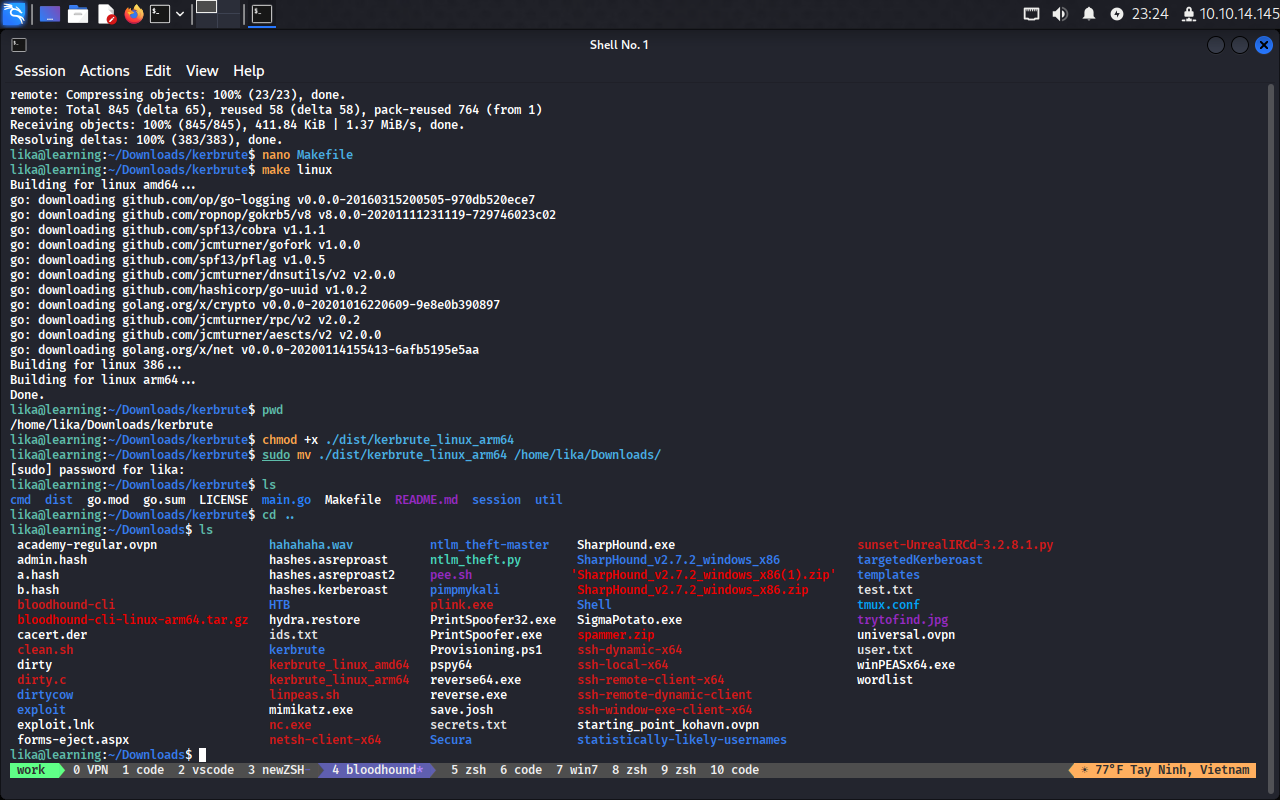
Máy mình xài là Mac M1 chip nên không có version của Kerbrute đúng, phải tự complile sang :((
git clone https://github.com/ropnop/kerbrute.git
cd kerbrute
nano makefile
tìm dòng ARCHS=amd64 386 arm64
chạy lệnh make linux
chmod +x ./dist/kerbrute_linux_arm64
sudo mv ./dist/kerbrute_linux_arm64 /home/lika/Downloads/
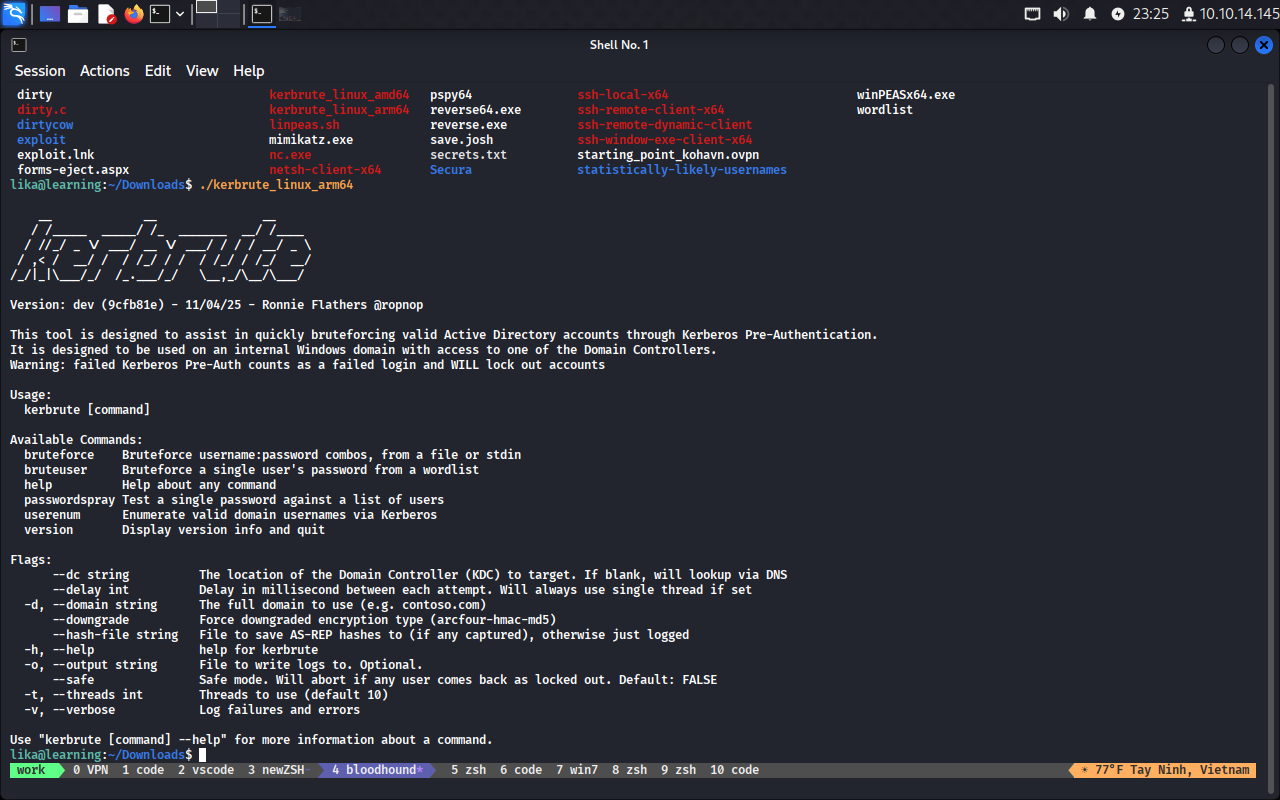
Đã chạy được kerbrute trên máy Attacker
Bài dài quá, kết thúc part 1, sang part 2 thối